
Video Output
Ready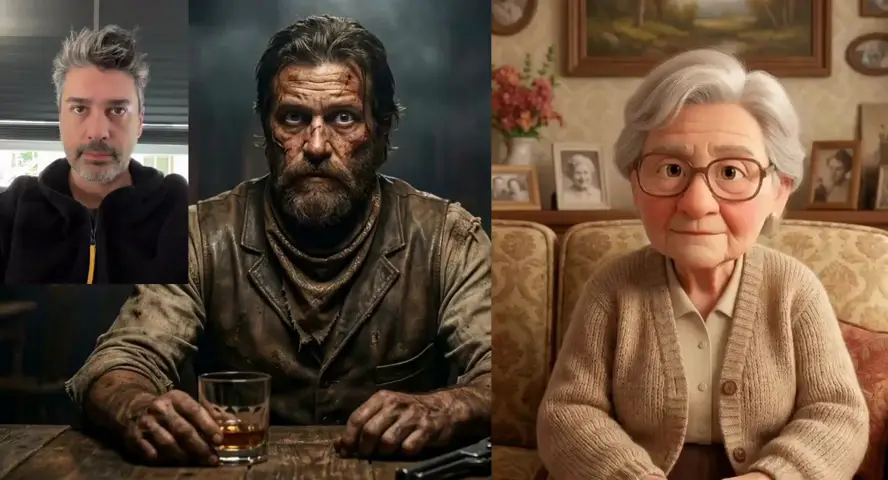
Motion Control AI & Kling Motion Control Gallery
Explore Motion Control AI and Kling Motion Control animations. See how Motion Control Pro brings static photos to life with Kling 3.0 Motion Control, transferring motion, expressions, and dance from reference videos.
Motion Control AI & Kling Motion Control — Animate Your Photos
Motion Control Pro delivers Motion Control AI powered by Kling 3.0 Motion Control. Transfer real motion, expressions, and dance from any reference video to your static image — create dynamic Kling Motion Control videos online in under 60 seconds.
Motion Control AI & Kling Motion Control Features
Six core capabilities of Motion Control AI and Kling 3.0 Motion Control on Motion Control Pro — with Kling 2.6 also supported — built to transfer body motion, gestures, expressions, and cinematic action with precision.
Motion & Expression Transfer
Motion Control AI and Kling Motion Control transfer full body motion, facial expressions, and gestures from a reference video to your photo. Kling 3.0 Motion Control keeps timing and rhythm for realistic results.
Dance & Performance Capture
Copy dance moves, athletic actions, and stage performance from any video. Motion Control AI with Kling 3.0 Motion Control is ideal for music clips, social content, and Kling Motion Control character animation.
Low-Cost Motion Capture
Replace costly motion capture gear with Motion Control AI. Motion Control Pro delivers pro-quality Kling 3.0 Motion Control animation from one photo and one reference video.
Kling 3.0 & Kling 2.6 Models
Run Motion Control AI with Kling 3.0 Motion Control for frame-accurate body tracking, hand gestures, and expression sync. Kling 2.6 is also supported, with 720p and 1080p output on Motion Control Pro.
Orientation Control
Choose image or video orientation for your Motion Control AI shot. Image mode fits portrait-led frames; video mode supports longer reference clips up to 30 seconds.
Prompt-Guided Styling
Add optional text to guide mood, camera, and expression in your Motion Control AI clip. Kling 3.0 refines the look without replacing your motion reference.
How to Use Motion Control AI & Kling Motion Control
Three simple steps from photo and reference video to finished Motion Control AI animation with Kling 3.0 Motion Control on Motion Control Pro.
Upload Photo & Reference Video
Add your character photo and a reference video with the motion you want. Kling Motion Control reads both files to prepare the Motion Control AI transfer.
AI Motion Processing
Kling 3.0 Motion Control captures motion, expressions, and body moves from the video and maps them to your photo. Motion Control Pro runs Motion Control AI with frame-accurate Kling Motion Control precision.
Download Animated Video
Preview your Kling Motion Control result and download the final clip. Your static image is now alive with Motion Control AI motion and expressions.
Motion Control AI & Kling Motion Control Use Cases
Motion Control AI and Kling Motion Control on Motion Control Pro help creators, marketers, and animators make character videos — no costly motion capture gear needed.
Dance & Social Videos
Use Kling Motion Control to copy trending dance moves to custom characters for TikTok, Reels, and Shorts with Motion Control AI speed.
Character Animation
Animate illustrated, realistic, or branded characters with Kling 3.0 Motion Control. Motion Control AI transfers walk cycles, gestures, and performance from any reference video.
Marketing & Brand Mascots
Make brand mascots dance, gesture, and present products with Kling Motion Control. Motion Control Pro turns static logos into dynamic Motion Control AI spokespeople.
Film & Previsualization
Test actor performance and scene motion before full production. Motion Control AI gives fast previews at a fraction of studio cost.
Education & Training
Turn one instructor photo into lesson clips with natural gestures and body language using Motion Control AI expression sync.
Personal & Creative Projects
Animate avatars, gift videos, and fun content with zero technical skills. Upload a photo and reference video — Motion Control AI handles the rest on Motion Control Pro.
Tips for Better Motion Control AI & Kling Motion Control
Get cleaner Motion Control AI and Kling Motion Control results from your character photo and reference video with these practical tips.
Use a Clear Full-Body Photo
Photos with visible head, shoulders, and torso produce more stable Kling Motion Control output. Motion Control AI works best with Kling 3.0 and front-facing, unobstructed subjects.
Keep Reference Videos Short
Short clips with one clear subject and simple motion are easier for Motion Control AI to follow. Video orientation mode supports up to 30 seconds.
Match Orientation on Purpose
Use image orientation to keep your character framing; use video orientation when the reference camera path matters more for Motion Control AI output.
Add a Simple Prompt
Describe mood, lighting, or camera feel to guide Motion Control AI without replacing the motion reference. Motion Control Pro keeps timing intact.
Who Uses Motion Control AI & Kling Motion Control?
Motion Control Pro powers Motion Control AI and Kling Motion Control for creators, marketers, educators, and teams worldwide.
Content Creators
YouTube and TikTok creators use Kling Motion Control and Motion Control AI to animate characters with transferred dance and gesture motion in minutes.
Marketers & Brands
Marketing teams build mascot and spokesperson videos with Motion Control AI for ads, product demos, and social campaigns on Motion Control Pro.
Filmmakers & Animators
Studios prototype character performance with Motion Control AI before full animation. Fast previews save time and cost on every project.
Educators & Trainers
Teachers create animated presenter clips with Motion Control AI to boost engagement in e-learning and training content.
Why Choose Motion Control Pro for Motion Control AI?
A focused Motion Control AI and Kling Motion Control workflow — fast, simple, and built for real creative production.
Motion Control AI & Kling Motion Control Built In
Run Motion Control AI and Kling Motion Control directly in Motion Control Pro — upload a photo and reference video, pick Kling 3.0 or Kling 2.6, and generate without extra software.
No Motion Capture Gear
Skip costly sensors and studio setups. Motion Control AI transfers real human motion to your photo at a fraction of traditional motion capture cost.
Fast Kling Motion Control Output
Most Motion Control AI and Kling 3.0 Motion Control videos are ready in about 40–60 seconds. Motion Control Pro tracks progress in real time so you can iterate quickly.
Credit-Based Pricing
Pay only for the Motion Control AI generations you run. Motion Control Pro offers free credits to try before you upgrade.
Motion Control AI & Kling Motion Control FAQ
Common questions about Motion Control AI and Kling Motion Control on Motion Control Pro.
What is Motion Control AI?
Motion Control AI is an AI tool that transfers motion, expressions, and actions from a reference video to a static photo. Motion Control Pro runs Kling 3.0 Motion Control so your character mimics dance moves, gestures, and performance — all through simple Kling Motion Control uploads.
What is Kling Motion Control?
Kling Motion Control is the motion transfer engine behind Motion Control AI on Motion Control Pro. It uses Kling 3.0 and Kling 2.6 models to map body movement, expressions, and dance from a reference video onto your photo.
What inputs does Motion Control AI need?
You need a character photo and a reference video. The photo is your subject; the video supplies the motion. Motion Control Pro accepts JPEG, PNG, MP4, MOV, and MKV files, with Kling 3.0 and Kling 2.6 model support.
What motion can Motion Control AI transfer?
Motion Control AI and Kling Motion Control can transfer dance choreography, athletic moves, facial expressions, hand gestures, and complex performances. Kling 3.0 Motion Control keeps the timing and rhythm of the original video for realistic animation.
Can Motion Control AI replace traditional motion capture?
Yes. Motion Control AI is a low-cost alternative to motion capture systems. Motion Control Pro removes the need for sensors, suits, and studio gear while still delivering pro-quality character animation.
What does character orientation mean in Motion Control AI?
Image orientation keeps the generated character closer to your photo framing. Video orientation follows the reference video camera path. Motion Control AI supports up to 10 seconds in image mode and up to 30 seconds in video mode.
How fast is Motion Control AI generation?
Most Kling Motion Control and Motion Control AI videos finish in about 40–60 seconds, depending on length and resolution. Motion Control Pro shows real-time Kling Motion Control progress so you can preview and download quickly.
What video quality does Motion Control AI support?
Kling 3.0 Motion Control on Motion Control Pro supports 720p and 1080p output. Generated Motion Control AI clips download as MP4 files ready for social media, ads, and client review.
Can I use Motion Control AI videos commercially?
Paid Motion Control Pro plans include commercial usage rights for Motion Control AI output. Free plan videos may include a watermark. Check your plan on the Pricing page.
Simple Motion Control Pricing
Choose the Motion Control Pro plan that fits your work. Start free, then upgrade for more credits and 1080p Motion Control AI video with Kling 3.0 Motion Control. No hidden fees.
Subscriptions renew automatically until canceled. You can manage or cancel anytime from Billing. By subscribing, you agree to our Terms of Service and Privacy Policy.